Instagram Downloader Online
Tool to download Instagram Video & Photo and Stories, Reels, Highlights
Instagram Photo Downloader
Paste the Instagram photo link below
Instagram Reels Downloader
Paste the Instagram Reels link below
Instagram Story Downloader
Paste the Instagram Story link below
InstaDP Downloader
Paste the Instagram Profile link below
🔶 Instagram Downloader: Video, Photo, Stories, Reels, Highlights, Profile
Want to download Instagram Videos and Photos? However, Instagram does not support download feature on their app. Rest assured, SaveVideo is a great solution for you! Savevideo.io is an online download tool that allows you to save and download videos and photos from Instagram in the best quality.
Savevideo.io is an online Instagram downloader, this tool allows you to download Instagram post content easily such as: Download Instagram videos, Photos, Highlights, Stories, IG Reels, Audio, Avatar and Thumbnails. All you need is an Instagram link and paste it into the input field on SaveVideo. Download Instagram videos and photos with just one click.
SaveVideo: Solution to download videos and photos from Instagram online
SaveVideo is a super, multi-functional application that helps users download Photos or Videos from any Instagram post. All premium features of SSGram are completely free. No need to install complicated software like other tools on the market.
Main Features of SaveVideo
- Supports all post formats: Video, Photo, Highlights, Video Reels, Story, Audio, Avatar.
- Simple & Fast: Download Instagram Post Photo or Video with just 1 tap.
- 100% free tool: No user fees or PRO upgrades.
- Safe & Secure: Does not collect user data nor track download history.
- Use directly on the web browser. Do not download and install any software.
- SaveVideo can be used on the web or download the SaveVideo app from the Play Store.
🔍 Saveinsta & Savevideo - Which Instagram downloader is better?
Saveinsta and Savevideo are both tools that support downloading content on Instagram and there are not many differences between the two. Both offer solutions that allow you to download Instagram photos and videos to your phone or computer in a few simple steps without any hassle.
The only difference is that SaveVideo is integrated with the ability to download thumbnails of videos or audio on Instagram. Up to now, SaveVideo Downloader and SaveInsta are both considered the best Instagram download tools.
In case SaveInsta has problems, you can try to use and experience SaveVideo's service. We promise, this tool will bring the best experience for you.
💡 How to download Instagram videos and photos without installing software with SaveVideo?
Savevideo.io works well on all browsers including Chrome, Firefox, Safari, Opera and Microsoft Edge, etc. By default, the tool will prioritize saving images and videos with the best quality. In addition, you can also choose the quality and size that suits your needs.
- First, open the Instagram app on your iPhone or Android phone.
- On Instagram, open any post with an image or video you want to download including the user's Profile.
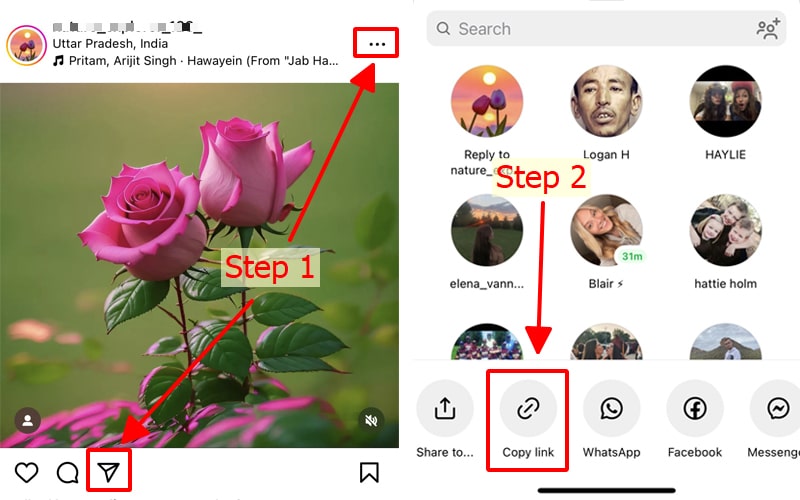
- Tap the post's Three Dots or Share icon and select Copy Link to save it to your clipboard.
- Open SaveVideo tool using a web browser, paste the Instagram post link in the input field and press the Download button (Starts the post data extraction process).
- Wait a few seconds for our servers to extract the data and save the photo or video to your device.
🚀 The reason for the birth of SaveVideo? Why should you use SaveVideo's tools?
We are regular users of the social network Instagram, and have a need to download our favorite content on Instagram to our devices. However, Instagram does not support download feature on their app. This is why we gathered, researched and released a tool to download Instagram called SaveVideo.
Currently there are many tools that support downloading photos and videos from Instagram. However, they often encounter errors and do not have all the necessary features. With SaveVideo, you will easily download any content on Instagram, including private Instagram photos and videos.
📝 How to copy Instagram video or photo link?
To download Instagram post content to your device, you must copy the link to the Instagram content you want to download. Please follow the instructions below:
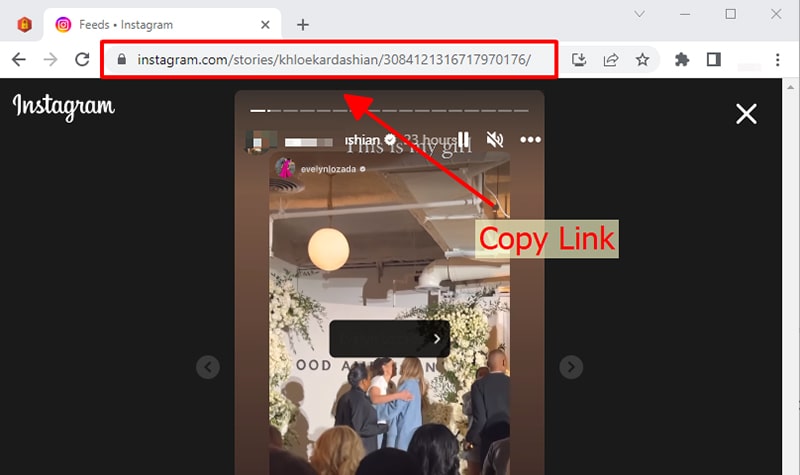
⭐ On PC/Mac (Using a web browser): Open the Instagram post with the photo or video you want to download and copy the link in your browser's address bar.
⭐ On iOS/Android: Open the Instagram app and navigate to the Instagram post, tap the share icon () or three dots (●●●) and select "Copy link".
✍ With just one click, SaveVideo will help you download your favorite Instagram content to your device completely free of charge. If you find this tool useful, please support us by recommending this website to your friends and relatives. Thank you!
FAQ
What is SaveVideo?
How to save Instagram videos and photos online?
- Step 1: Find the Instagram video or photo you want to download and copy the link.
- Step 2: Go to Savevideo.io, paste the IG link into the input field and press the "Download" button.
- Step 3: A list of your videos or photos will be displayed. Now, you can save it to your device.